}}
There are three css common class for print view in FixIt Theme.
* `page-break-before` Insert page break before element
* `page-break-after` Insert page break after element
* `print-d-none` Hide elements in print view
Here is a simple exmple:
```html
Something you want to hide in the print view is written here.
```
## 4 Multilingual and i18n
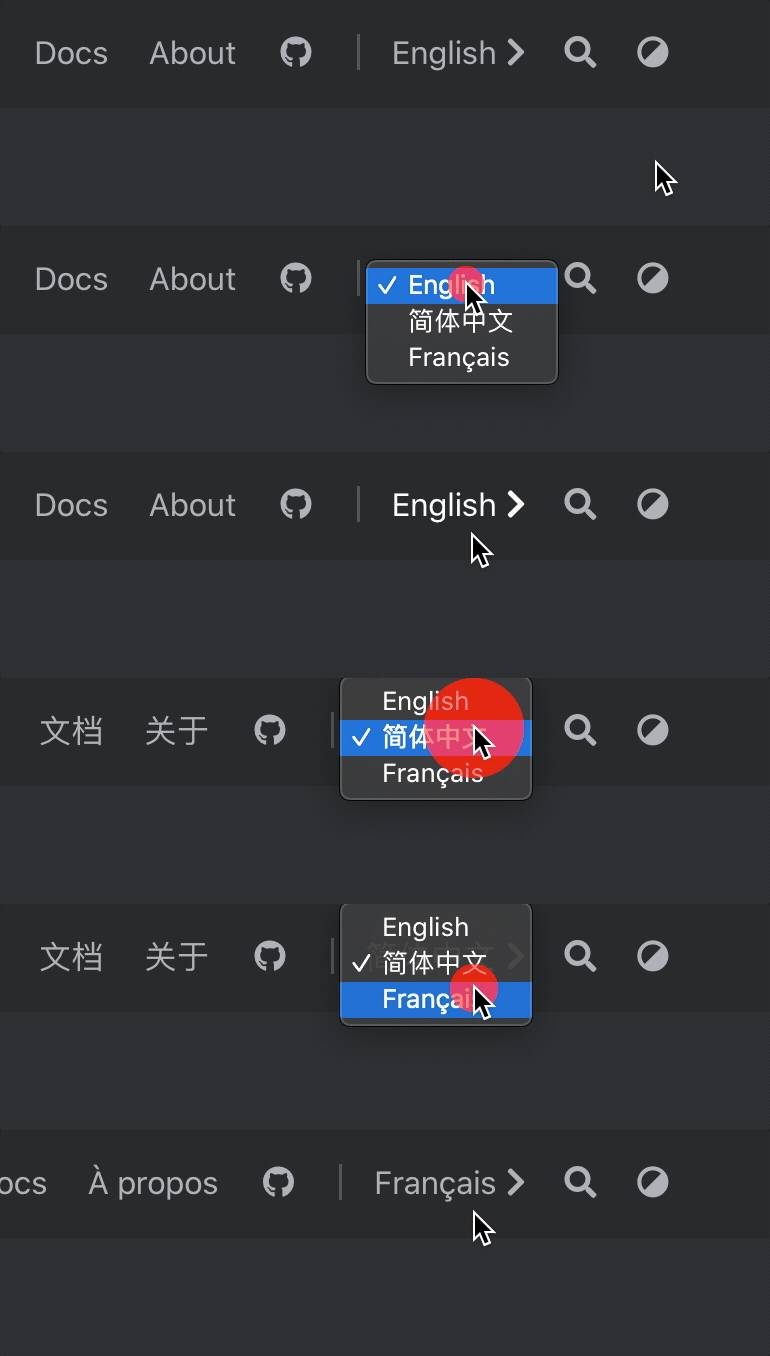
**FixIt** theme is fully compatible with Hugo multilingual mode, which provides in-browser language switching.
### 4.1 Compatibility {#language-compatibility}
{{< version 0.2.10 changed >}}
| Language | Hugo Code | HTML `lang` Attribute | Theme Docs | Lunr.js Support |
|:-------------------- |:---------:|:---------------------:|:-----------------------------:|:-----------------------------:|
| English | `en` | `en` | :(far fa-check-square fa-fw): | :(far fa-check-square fa-fw): |
| Simplified Chinese | `zh-cn` | `zh-CN` | :(far fa-check-square fa-fw): | :(far fa-check-square fa-fw): |
| French | `fr` | `fr` | :(far fa-square fa-fw): | :(far fa-check-square fa-fw): |
| Polish | `pl` | `pl` | :(far fa-square fa-fw): | :(far fa-square fa-fw): |
| Brazilian Portuguese | `pt-br` | `pt-BR` | :(far fa-square fa-fw): | :(far fa-check-square fa-fw): |
| Italian | `it` | `it` | :(far fa-square fa-fw): | :(far fa-check-square fa-fw): |
| Spanish | `es` | `es` | :(far fa-square fa-fw): | :(far fa-check-square fa-fw): |
| German | `de` | `de` | :(far fa-square fa-fw): | :(far fa-check-square fa-fw): |
| Serbian | `sr` | `sr` | :(far fa-square fa-fw): | :(far fa-square fa-fw): |
| Russian | `ru` | `ru` | :(far fa-square fa-fw): | :(far fa-check-square fa-fw): |
| Romanian | `ro` | `ro` | :(far fa-square fa-fw): | :(far fa-check-square fa-fw): |
| Vietnamese | `vi` | `vi` | :(far fa-square fa-fw): | :(far fa-check-square fa-fw): |
| Traditional Chinese | `zh-tw` | `zh-TW` | :(far fa-square fa-fw): | :(far fa-check-square fa-fw): |
### 4.2 Basic Configuration
After learning [how Hugo handle multilingual websites](https://gohugo.io/content-management/multilingual), define your languages in your [site configuration](#site-configuration).
For example with English, Chinese and French website:
```toml
# [en, zh-cn, fr, pl, ...] determines default content language
defaultContentLanguage = "en"
[languages]
[languages.en]
weight = 1
title = "My New Hugo Site"
languageCode = "en"
languageName = "English"
[[languages.en.menu.main]]
identifier = "posts"
pre = ""
post = ""
name = "Posts"
url = "/posts/"
title = ""
weight = 1
[[languages.en.menu.main]]
identifier = "tags"
pre = ""
post = ""
name = "Tags"
url = "/tags/"
title = ""
weight = 2
[[languages.en.menu.main]]
identifier = "categories"
pre = ""
post = ""
name = "Categories"
url = "/categories/"
title = ""
weight = 3
[languages.zh-cn]
weight = 2
title = "我的全新 Hugo 网站"
# language code, CN only here
languageCode = "zh-CN"
languageName = "简体中文"
# whether to include Chinese/Japanese/Korean
hasCJKLanguage = true
[[languages.zh-cn.menu.main]]
identifier = "posts"
pre = ""
post = ""
name = "文章"
url = "/posts/"
title = ""
weight = 1
[[languages.zh-cn.menu.main]]
identifier = "tags"
pre = ""
post = ""
name = "标签"
url = "/tags/"
title = ""
weight = 2
[[languages.zh-cn.menu.main]]
identifier = "categories"
pre = ""
post = ""
name = "分类"
url = "/categories/"
title = ""
weight = 3
[languages.fr]
weight = 3
title = "Mon nouveau site Hugo"
languageCode = "fr"
languageName = "Français"
[[languages.fr.menu.main]]
identifier = "posts"
pre = ""
post = ""
name = "Postes"
url = "/posts/"
title = ""
weight = 1
[[languages.fr.menu.main]]
identifier = "tags"
pre = ""
post = ""
name = "Balises"
url = "/tags/"
title = ""
weight = 2
[[languages.fr.menu.main]]
identifier = "categories"
name = "Catégories"
pre = ""
post = ""
url = "/categories/"
title = ""
weight = 3
```
Then, for each new page, append the language code to the file name.
Single file `my-page.md` is split in three files:
* in English: `my-page.en.md`
* in Chinese: `my-page.zh-cn.md`
* in French: `my-page.fr.md`
{{< admonition >}}
Be aware that only translated pages are displayed in menu. It’s not replaced with default language content.
{{< /admonition >}}
{{< admonition tip >}}
Use [Front Matter parameter](https://gohugo.io/content-management/multilingual#translate-your-content) to translate urls too.
{{< /admonition >}}
### 4.3 Overwrite Translation Strings
Translations strings are used for common default values used in the theme. Translations are available in [some languages](#language-compatibility), but you may use another language or want to override default values.
To override these values, create a new file in your local i18n folder `i18n/.toml` and inspire yourself from `themes/FixIt/i18n/en.toml`.
By the way, as these translations could be used by other people, please take the time to propose a translation by [:(fas fa-code-branch fa-fw): making a PR](https://github.com/Lruihao/FixIt/pulls) to the theme!
## 5 Search
{{< version 0.2.0 >}}
Based on [Lunr.js](https://lunrjs.com/) or [algolia](https://www.algolia.com/), searching is supported in **FixIt** theme.
### 5.1 Output Configuration
In order to generate `index.json` for searching, add `JSON` output file type to the `home` of the `outputs` part in your [site configuration](#site-configuration).
```toml
[outputs]
home = ["HTML", "RSS", "JSON"]
```
### 5.2 Search Configuration
Based on `index.json` generated by Hugo, you could activate searching.
Here is the search configuration in your [site configuration](#site-configuration):
```toml
[params.search]
enable = true
# type of search engine ("lunr", "algolia")
type = "lunr"
# max index length of the chunked content
contentLength = 4000
# placeholder of the search bar
placeholder = ""
# {{< version 0.2.1 >}} max number of results length
maxResultLength = 10
# {{< version 0.2.3 >}} snippet length of the result
snippetLength = 30
# {{< version 0.2.1 >}} HTML tag name of the highlight part in results
highlightTag = "em"
# {{< version 0.2.4 >}} whether to use the absolute URL based on the baseURL in search index
absoluteURL = false
[params.search.algolia]
index = ""
appID = ""
searchKey = ""
```
{{< admonition note "How to choose search engine?" >}}
The following is a comparison of two search engines:
* `lunr`: simple, no need to synchronize `index.json`, no limit for `contentLength`,
but high bandwidth and low performance (Especially for Chinese which needs a large segmentit library)
* `algolia`: high performance and low bandwidth, but need to synchronize `index.json` and limit for `contentLength`
{{< version 0.2.3 >}} The content of the post is separated by `h2` and `h3` HTML tag to improve query performance and basically implement full-text search.
`contentLength` is used to limit the max index length of the part starting with `h2` and `h3` HTML tag.
{{< /admonition >}}
{{< admonition tip "Tips about algolia" >}}
You need to upload `index.json` files to algolia to activate searching.
You could upload the `index.json` files by browsers but a CLI tool may be better.
[Algolia Atomic](https://github.com/chrisdmacrae/atomic-algolia) is a good choice.
To be compatible with Hugo multilingual mode,
you need to upload different `index.json` for each language to the different index of algolia, such as `zh-cn/index.json` or `fr/index.json`...
{{< /admonition >}}
---
{{< admonition quote "Thanks" >}}
_Thanks to the original author [Dillon](https://dillonzq.com) for preparing and revising the content before version `v0.2.10` in this documentation._
{{< /admonition >}}